<link rel="stylesheet" href="https://www.hubspot.com/hubfs/hub_generated/template_assets/1/207928094053/1777556954236/template_footer-core-non-critical.min.css">
Logo - Full (Color)

Identify Buyer Intent

User Persona Sales
Use Case Readiness Established

Stop guessing who is ready to buy.

Let AI surface the signals that matter.

HubSpot Video

Know Which Accounts are Ready to Buy

Buyer Intent identifies which companies are visiting your website, researching topics you sell, and showing real buying signals. Your reps see who to focus on and why, so they stop chasing cold accounts and start warm conversations.

Start with Buyer Intent to surface warm accounts. Then layer in Prospecting Agent and Company Research Agent to engage at the right moment with the right message.

Learn more

Book

69%

more meetings on average when using Buyer Intent

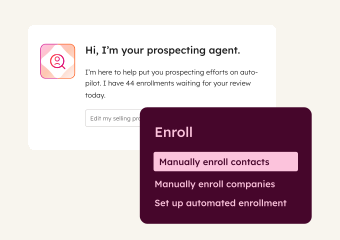
Enroll

2x

more prospects in sales sequences on average

After comparing our current website tracking tool (a leader in the space) with HubSpot buyer intent over 14 days, the results were clear: HubSpot showed three times as many companies visiting our website.

KATIE MCCAULEY

SnapFulfil

snapfulfil_logo

Starter, All Products

Get Started with Buyer Intent

Set up Buyer Intent in minutes and start seeing which companies are ready to buy.

Step 1 - Install Your Tracking Code

Ensure the HubSpot tracking code is installed on your website. This lets HubSpot identify which companies are visiting and what pages they are viewing.

Step 2 - Define Your Target Market

Navigate to Settings, then Markets, and set up your target market criteria. This tells Buyer Intent which types of companies matter most to your business.

Step 3 - Set Visitor Intent Criteria

Choose the pages on your website that signal real interest, like your pricing page, demo request page, or product pages. Then refine by visit count, number of unique visitors, and the countries you care about most.

Step 4 - Choose Research Topics

Select topics that match what your business sells. You can type them in freeform to find matches, or enter your website domain to get personalized topic recommendations based on your business.

Step 5 - Automate Account Creation

Build saved views that represent your highest-fit accounts. Then set up automations to add new companies to your CRM when they meet your criteria.

Step 6 - Track Accounts for Signals

Select companies to monitor. Once tracked, HubSpot watches for buying moments like funding rounds, executive hires, visits to high-intent pages on your website, and research into topics relevant to your business. When a signal fires, act on it in workflows, segments, and lead scoring.

Step 1 - Install Your Tracking Code

Ensure the HubSpot tracking code is installed on your website. This lets HubSpot identify which companies are visiting and what pages they are viewing.

Step 2 - Define Your Target Market

Navigate to Settings, then Markets, and set up your target market criteria. This tells Buyer Intent which types of companies matter most to your business.

Step 3 - Set Visitor Intent Criteria

Choose the pages on your website that signal real interest, like your pricing page, demo request page, or product pages. Then refine by visit count, number of unique visitors, and the countries you care about most.

Step 4 - Choose Research Topics

Select topics that match what your business sells. You can type them in freeform to find matches, or enter your website domain to get personalized topic recommendations based on your business.

Step 5 - Automate Account Creation

Build saved views that represent your highest-fit accounts. Then set up automations to add new companies to your CRM when they meet your criteria.

Step 6 - Track Accounts for Signals

Select companies to monitor. Once tracked, HubSpot watches for buying moments like funding rounds, executive hires, visits to high-intent pages on your website, and research into topics relevant to your business. When a signal fires, act on it in workflows, segments, and lead scoring.

Turn it on. Watch it work.

Once Buyer Intent is active, it monitors your target accounts around the clock. When a company visits your pricing page, researches a topic you sell, or lands new funding, your reps know about it. No manual monitoring. No missed signals.

What to expect:

  • Warm accounts surfaced within minutes of setup

  • Signals fire in real time across your CRM

  • Reps know who to call and why, every single day

This is the difference between chasing cold accounts and engaging warm ones.

Go Deeper with More Breeze Tools

Once Buyer Intent is surfacing warm accounts, add these tools to turn signals into meetings.
prospecting_agent

Sales Hub Starter

Prospecting Agent

Monitors enrolled prospects 24/7 for buying signals and crafts personalized outreach when it's time to reach out. Use it to engage at the right moment with messaging that references what changed.
company_research_agent_2x

Starter, All Products

Company Research Agent

Provides deep research on workforce, audience, funding data, and online presence before every interaction. Use it to walk into conversations informed without spending hours on manual research.