• HubSpot Logo

Free Sales Lead Tracker Template for Excel, PDF, & Google Sheets

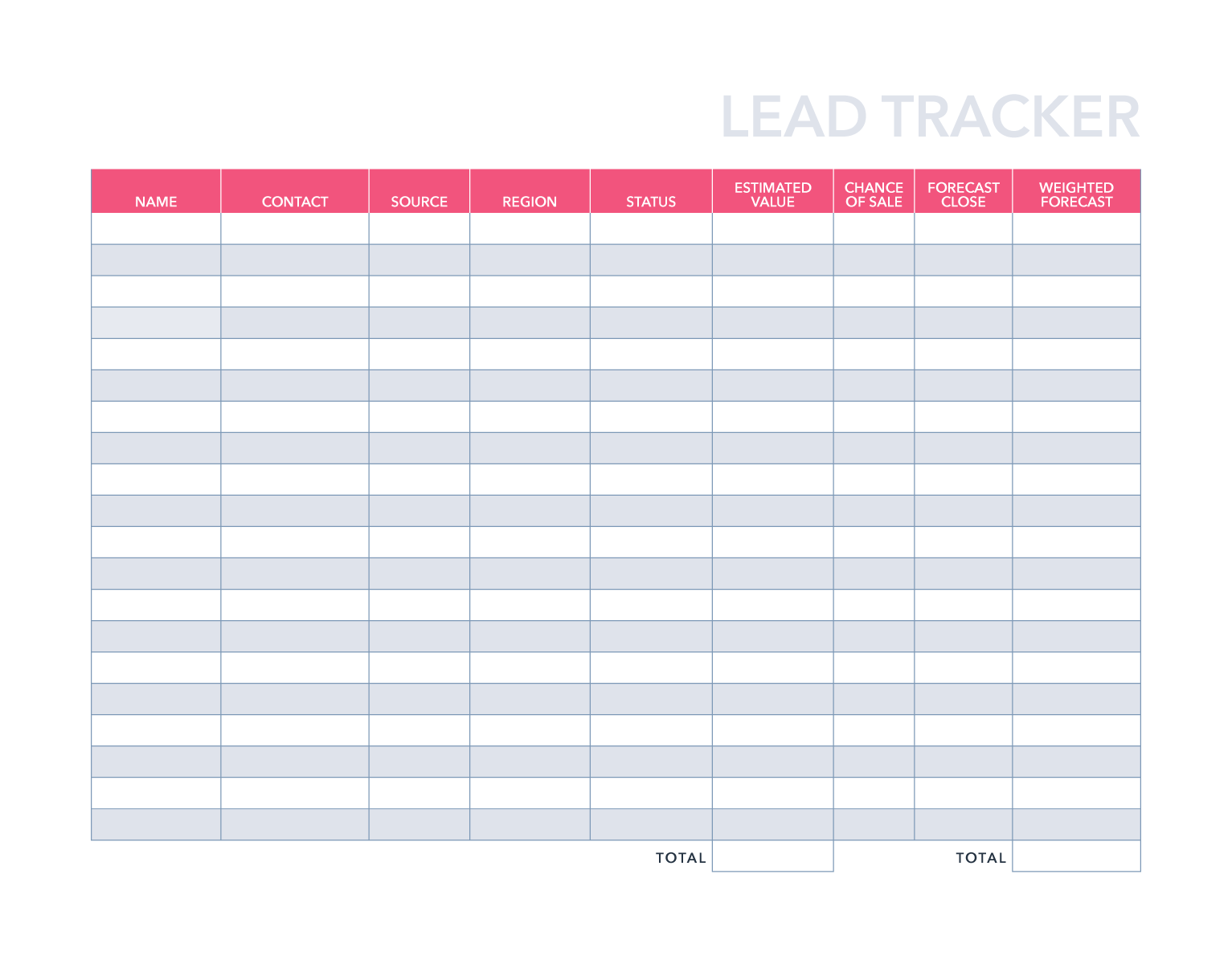
HubSpot's free Sales Lead Tracker template gives you a ready-to-use sales lead tracking system in Excel, Google Sheets, or PDF format. Organize prospects, schedule follow-ups, and improve conversion rates starting today.

Join thousands of professionals using this template to track their first leads.

Sales Lead Tracker Template Best Practices

What Is a Sales Lead Tracker Template?

A sales lead tracker template is a structured spreadsheet or form that helps salespeople and small business owners record prospect information, monitor deal stages, and schedule follow-up activities in one place. Effective sales lead tracking methods rely on consistent data entry across fields like contact name, lead source, deal stage, follow-up date, and win probability.

HubSpot's free lead tracker template is available in three formats — Excel (.xlsx), Google Sheets, and PDF — making it compatible with however your team already works.


Who Should Use a Lead Tracking Spreadsheet?

This sales lead tracking template is the right tool when:

  • You're managing 25–75 active leads. The spreadsheet handles this volume comfortably with 1–2 hours of weekly maintenance. Manual tracking at this scale is practical and teaches you which lead sources convert best.
  • You're adding fewer than 10 new leads per week. At this volume — typical for early-stage outreach, referrals, or networking — a free lead tracker in Excel or Google Sheets is both sufficient and educational.
  • You're refining your sales process. The first 2–6 months with a sales tracking spreadsheet is when you experiment with qualification criteria, follow-up cadences, and closing techniques. Understanding this data hands-on prepares you to graduate to automated CRM software.
  • You're working solo or with one partner. The template supports individual contributors and two-person teams using Google Sheets for lightweight real-time collaboration.
  • You need zero cost. This sales lead tracker is completely free — no subscription, no credit card, no expiration.

Why Lead Tracking Matters for Sales Performance

Sales lead tracking is the foundation of a repeatable, improvable sales process. Without a system — whether a printable sales tracking sheet, an Excel sales tracking template, or a CRM — promising prospects fall through the cracks and revenue opportunities go unmeasured.

Structured sales lead tracking delivers four measurable outcomes:

  • Better pipeline visibility: A lead tracker gives you a clear view of every prospect and their current deal stage, so you always know what needs attention next.
  • Smarter follow-up: A follow-up tracker in Excel or Google Sheets surfaces overdue contacts before they go cold — one of the most effective sales lead tracking techniques available without automation.
  • Improved conversion rates: Analyzing your completed sales tracking spreadsheet reveals which lead sources, outreach methods, and deal stages perform best, so you can optimize your process over time.
  • Revenue growth: Consistent tracking puts you in a position to work every lead — not just the ones you happen to remember.

Lead Tracker Template vs. HubSpot Free CRM: Which Do You Need?

The right choice depends on your volume and stage. A free lead tracker in Excel or Google Sheets is the most effective sales lead tracking system for early-stage sellers who want to understand their pipeline before automating it. When you're consistently generating more than 10 leads per week or managing 75+ contacts, HubSpot's free CRM is the logical next step — and you can import your spreadsheet data directly.

  Lead Tracker Sheet HubSpot CRM
Capacity 25–75 leads 75+ leads
Best for First 2-6 months Scaleable growth
Weekly time 1-2 hrs 20-30 min
Lead capture Manual entry Automatic capture from web forms
Follow-up reminders Alerts you set manually Automated notifs
Email tracking Not available Real-time open and click tracking
Lead prioritization Based on judgement AI scoring based on customer behavior
Team access Limited; potential version conflicts Unlimited users; real-time sync
Lead source tracking Manual spreadsheet analysis Automatic dashboards
Cost Free Free CRM, upgrade to premium


Sales Lead Tracker Template Formats Explained: 

Excel Sales Lead Tracking Template

The Excel sales tracking template (.xlsx) works offline and integrates with any Windows or Mac environment. It's the best choice for sellers who already use Microsoft Office or need a sales lead tracker Excel file they can customize with formulas, conditional formatting, or macros. The sales lead tracker Excel template includes all data fields, a dashboard tab, and a configurations tab out of the box.

Google Sheets Lead Tracker

The Google Sheets sales tracker template is free and works in any browser without software installation. It's the best choice for teams that need basic real-time collaboration — a sales partner can update the same lead tracker Google Sheets file simultaneously. The google sheets lead tracker auto-saves and is accessible from any device. This format is also the easiest to share as a google sheets sales tracker template free of charge.

PDF Sales Lead Tracking Form

The PDF format works as a printable sales tracking sheet for field sales, trade shows, or any situation where you need a physical sales lead sheet or paper-based sales tracking form. It's the right choice for capturing information before it gets entered into your digital tracking sheet template.

Man with laptop in living room

Outgrowing your spreadsheet?

When you're managing more leads than a spreadsheet can handle, HubSpot's free CRM picks up where this template leaves off. Experience automatic lead capture, follow-up reminders, email tracking, and real-time pipeline reporting. No manual updates required.

Frequently Asked Questions

The most effective sales lead tracking technique for early-stage sellers is HubSpot's structured Sales Lead Tracker spreadsheet that records every prospect's contact information, deal stage, last contact date, and next follow-up action. Consistency matters more than complexity: a simple sales lead tracking template used daily outperforms a sophisticated system used inconsistently.

A complete sales lead tracking template should capture: company name, contact name, lead source, region, deal stage, win probability, estimated deal value, and more. HubSpot's free template includes all of these fields plus a reporting function that calculates conversion rates and deal values automatically.

A lead tracker focuses on early-stage prospect management – capturing inbound leads, qualifying them, and scheduling initial outreach. A deal tracker template typically begins at the opportunity stage, after qualification, and tracks deal value, close probability, and pipeline forecasting. HubSpot's template functions as both: it covers the full journey from lead capture through closed-won.

A lead tracking template in Excel or Google Sheets is a manual system best suited for 25–75 contacts over 2–6 months. A CRM (customer relationship management platform) automates lead capture, follow-up reminders, email tracking, and reporting at unlimited scale. HubSpot's free CRM is the natural upgrade from this spreadsheet, offering direct data import and no cost to start.

Yes. While the template is designed for sales lead tracking, the same structure (source, stage, conversion rate, follow-up date) applies to marketing lead management. Use it as a marketing tracking spreadsheet to track which campaigns generate leads, which convert to opportunities, and which produce closed revenue.

Yes. HubSpot's sales lead tracker template is completely free in all three formats — Excel, Google Sheets, and PDF! 

In Google Sheets, share via a link with "Editor" or "Viewer" permissions. In Excel, share via email attachment or save to a shared drive. For small teams, the Google Sheets version works best for real-time collaboration. For teams managing more than 75 leads or needing role-based access controls, HubSpot's free CRM supports unlimited users with real-time sync.

The most reliable business sales lead tracking methods share three principles:

  1. Record every lead at point of contact, not retroactively. 
  2. Always set a specific next-action date rather than leaving follow-ups open-ended. 
  3. Review your full pipeline on a fixed weekly schedule to catch anything that has stalled. 

These habits work equally well in a sales lead tracking template Excel file or in a CRM.

Switch from a sales tracking spreadsheet to a CRM when: you're adding more than 10 new leads per week, managing 75+ active contacts, working with more than one salesperson, or losing track of follow-ups consistently. At that point, manual tracking costs more in missed opportunities than the time saved by avoiding software.

Yes. The spreadsheet is fully editable — add, remove, or rename columns to match your sales process. Common customizations include adding industry-specific deal stages, custom lead source categories, or fields for contract value and renewal dates.

See other Business Templates

Get the template for free!