Everything you can do with the HubSpot connector for ChatGPT
Use chat for
Use chat for quick, one-off searches to accelerate your daily productivity, previewing results inside ChatGPT. Ask questions like "How many high priority tickets were created last week?" or "List deals closing this month by deal size."
Use deep research for
Use deep research for complex projects that require deeper analysis across multiple sources at once, with citations back to originals. Ask questions like "What are the most common reasons deals were lost last quarter?" or "Summarize key customer support trends over the past 6 months."
Take action
Go beyond research — create campaigns, build landing pages, manage leads, and update records directly from your ChatGPT conversation. Ask something like "Create a landing page for our Q3 campaign" or "Update the lead status for contacts from last week's webinar."
AI should be easy to use and easy to trust.
Access in minutes, no complex setup required. Access is secure and permission-based, so users only see what they’re authorized to view.
Ask anything in natural language, from quick, tactical questions to deep, PhD-level research, and get answers you can turn into action.
Ensure your Super Admin or a user with App Marketplace Permissions completes the HubSpot setup first. Once enabled, others in your organization can connect by following the same steps. For team-wide rollouts, a super admin must install and configure the connector first.
Already using the connector? Customers using the connector before this update may need to upgrade or reconnect it to access the new campaign, content, custom-object, and write capabilities. Follow the same setup steps to reconnect.
A ChatGPT workspace admin may also need to enable the updated HubSpot connector on their end.
To learn more about how OpenAI trains on data, see our Knowledge Base.
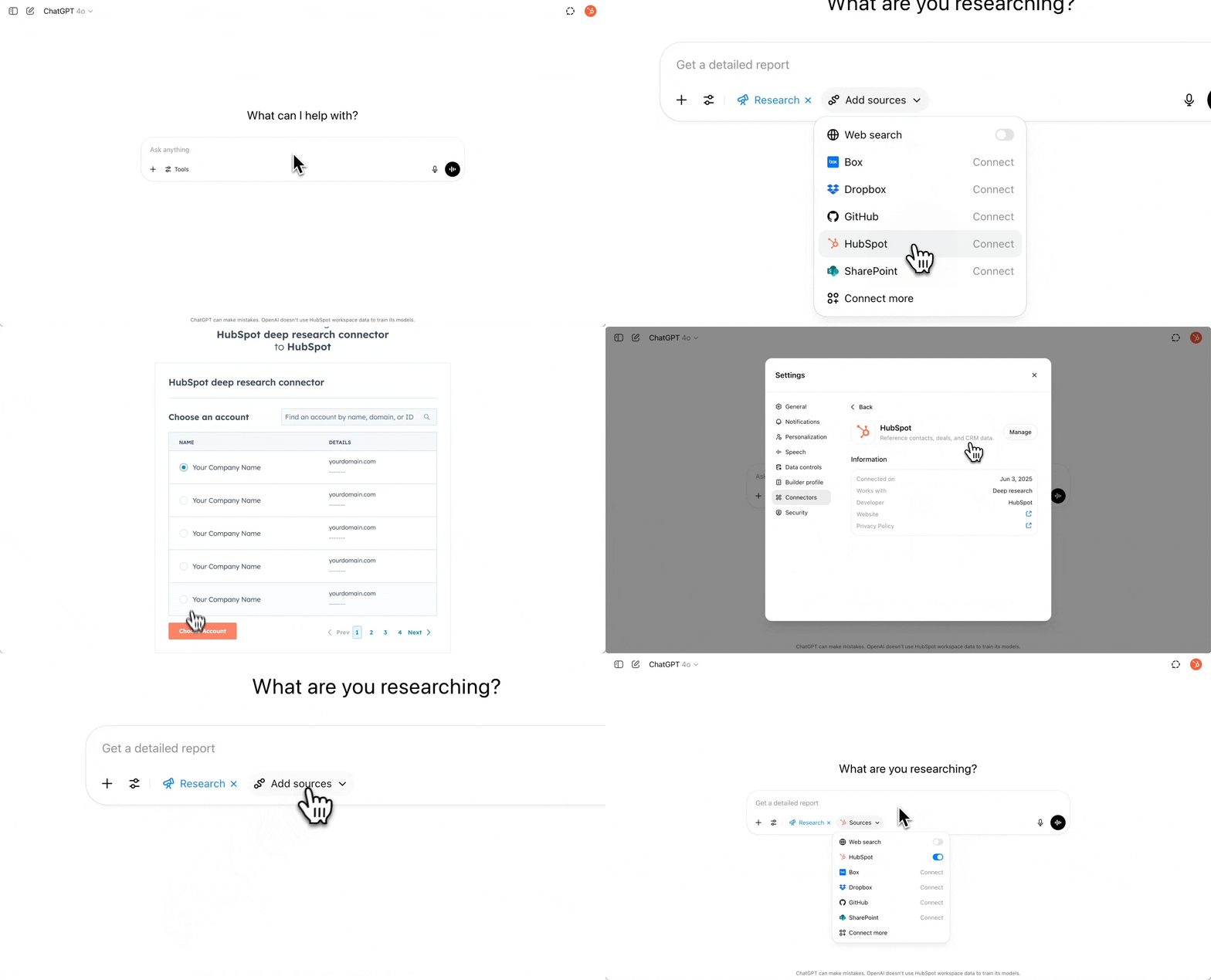
1. Log into ChatGPT and go to settings
Log into ChatGPT, select your profile icon in the top-right corner, click Settings > Connectors, and find the HubSpot connector.
2. Connect your desired HubSpot Account
Choose “Connect” on the HubSpot connector, you'll now be directed to the HubSpot portal selector, where you can select your preferred account and click “Choose Account”.
3a. To use chat with HubSpot
Start a new chat and click on “Tools > Use connectors”. In the “Add sources” menu, toggle the option to use your HubSpot CRM as the data source and start getting quick answers to one-off questions.
3b. To use deep research with HubSpot
Start a new chat and enable “Deep Research.” In the sources menu, toggle the option to use your HubSpot CRM as the data source and you’re ready to start exploring your CRM data to get PhD level insights.
Empower every team with the HubSpot connector for ChatGPT
Marketing Teams
Create landing pages, manage campaigns, and connect performance data to revenue and deal outcomes — all from a single ChatGPT conversation. Or use deep research to find high-converting contacts and build tailored nurture sequences.
Sales Teams
Create and update leads using engagement data, track lead pipelines, and analyze lead-to-deal conversion rates. Use deep research to find new expansion opportunities by segmenting target accounts by revenue, industry, and tech stack.
Customer Success Teams
Drive retention by identifying inactive companies with growth potential and generating target plays to re-engage and revive pipelines.
Support Teams
Analyze seasonal ticket trends to forecast staffing needs. Paired with Breeze Customer Agent, plan ahead and manage ticket surges seamlessly in HubSpot.
Operations Teams
Run advanced HubSpot analyses without manually building reports or memorizing property names. Use schema discovery to explore your account's data model, and query across custom and activatable objects specific to your business.
Looking for more use cases or have questions about the HubSpot connector?
Find extended use cases, answers to frequently asked questions, and general information quickly about the HubSpot connector for ChatGPT on our knowledge base.
The HubSpot connector for ChatGPT is available to all HubSpot customers across all plans with an OpenAI account. Access to individual features depends on your HubSpot subscription, enabled objects, and user permissions. Some capabilities — including content analytics, custom objects, and campaign or landing page actions — may require an eligible HubSpot subscription and additional permissions.
The connector respects all existing HubSpot CRM permissions — users only see the data they're authorized to access.
Visit the HubSpot Knowledge Base for setup instructions and the latest available features.
Frequently Asked Questions
The HubSpot connector for ChatGPT lets you ask questions, run deep analysis, and take action on your HubSpot data in natural language, without leaving ChatGPT. Available in the web version of ChatGPT, the connector supports core CRM objects (contacts, companies, deals, tickets), campaigns, landing pages, leads, custom objects, and activatable objects (appointments, projects, listings, services, courses), along with their associations, standard properties, and custom properties.
It offers two main modes — chat for quick, everyday questions, and deep research for analysis — as well as write actions to create and update records directly in HubSpot.
The HubSpot connector mirrors your existing HubSpot permissions — what you can access inside HubSpot is exactly (and only) what you can access through ChatGPT. Super admins control which permissions are enabled and can revoke access at any time.
Customers will not be able to access custom Sensitive Data Properties or sensitive content from other Sensitive Data Covered Services, including Personal Health Information and other Highly Sensitive Data.
Yes. The connector combines ChatGPT's AI capabilities with your HubSpot CRM context, allowing you to identify patterns in successful deals, customer behavior trends, and optimization opportunities. Rather than manually digging through data, you get AI-powered insights that help you understand what's working and how to improve future campaigns.
Yes. The connector supports write actions including creating and updating campaigns, landing pages, leads, custom objects, and activatable objects (appointments, projects, listings, services, courses). Each action respects your existing HubSpot permissions — you can only create or update records you'd have access to inside HubSpot itself.
The connector is available to all HubSpot customers across all plans. However, some capabilities, including content analytics, custom objects, and campaign or landing page actions may require an eligible HubSpot subscription and additional permissions. Visit the HubSpot Knowledge Base for a full breakdown of feature availability by plan.
Loop Marketing is HubSpot's framework for growth in the AI era that operates in four dynamic stages: Express (define your brand identity), Tailor (personalize your message), Amplify (diversify channels), and Evolve (optimize in real-time).
HubSpot's connector for ChatGPT supports several of these stages by making it easier to express your brand in a way that resonates with your top customers and tailor your message to connect with them in meaningful ways. Use the connector to analyze your highest-value customers from your CRM data and understand what they care about, analyze behavioral signals to create relevant messages, and identify high-intent partners within your industry to amplify your messaging. This enables data-driven marketing decisions based on real customer insights, rather than assumptions.
For the latest setup information and connection steps, visit the knowledge base article on setting up the HubSpot connector for ChatGPT. It provides detailed, up-to-date instructions for connecting a HubSpot account.