• HubSpot Logo

Free Social Media Report Template

A social media report template gives marketing teams a structured way to track performance across platforms – followers, engagement rate, reach, and conversions – and present results clearly to stakeholders.

HubSpot's social media report template is available for download in five formats: Google Docs, Google Slides, Microsoft Word, Microsoft PowerPoint, and PDF.

Join thousands of professionals using this templates.

What Is a Social Media Report?

A social media report is a structured document that aggregates performance data from platforms like Facebook, Instagram, LinkedIn, X (formerly Twitter), and YouTube into a single, readable summary. Social media reports answer a core business question: is your social activity generating measurable results?

Marketing teams use social media reports to document month-over-month changes in audience size, engagement rate, reach, and conversions. A well-built social media reporting template makes it faster to compile this data consistently — and easier for stakeholders to act on it.


Who This Free Social Media Report Template Is For

HubSpot's free social media report template is designed for marketing teams that produce monthly or quarterly reports for stakeholders. This template works best when you are:

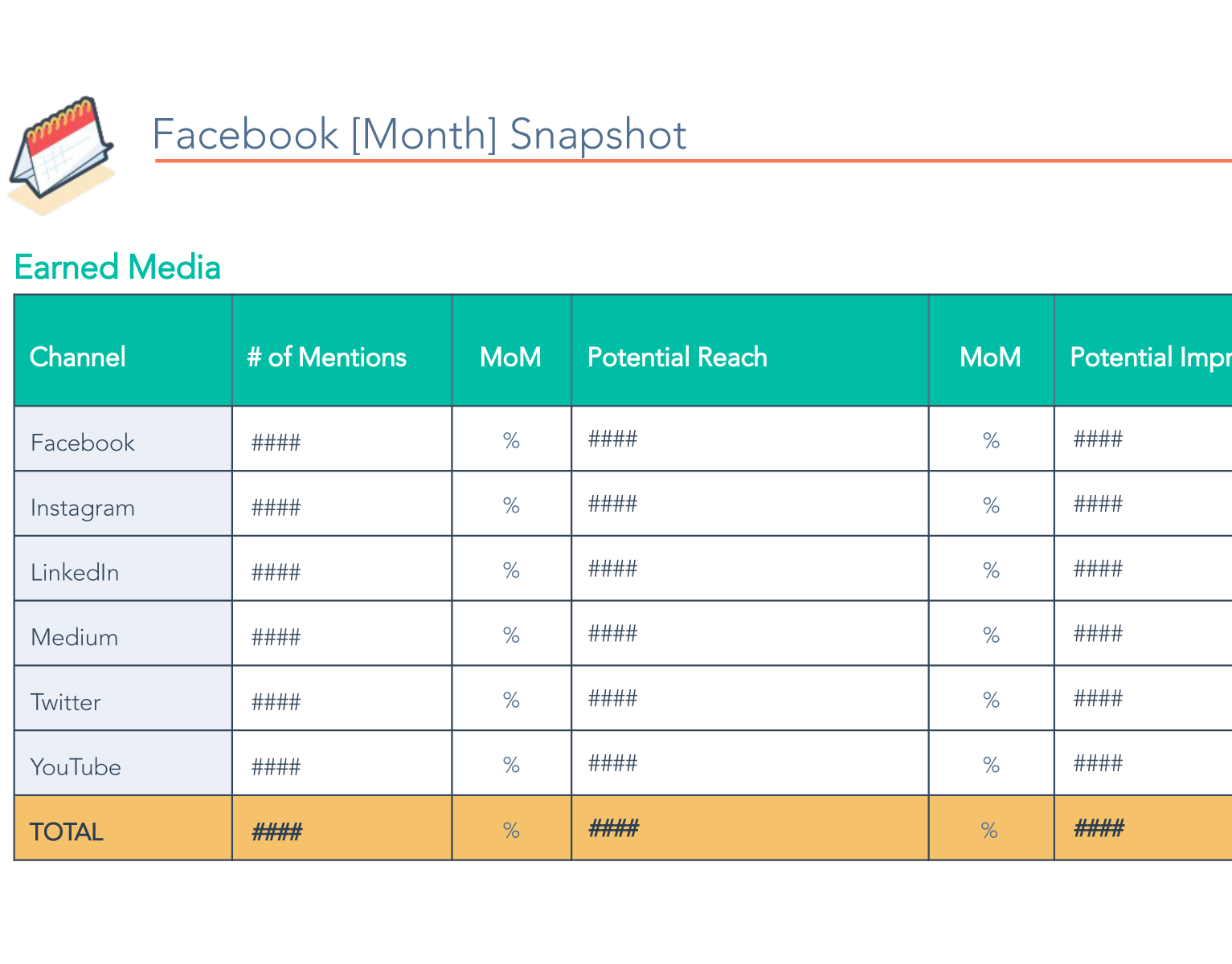
  • Managing 3–5 social channels: The template includes pre-formatted sections for Facebook, Instagram, LinkedIn, X (Twitter), and YouTube, with space for metrics like audience size, post volume, engagement rate, and month-over-month (MoM) changes.
  • Reporting monthly or quarterly: Manual social media reporting takes approximately 1–2 hours per monthly cycle and 2–3 hours per quarterly cycle with this template. Teams needing weekly reports may benefit from automated dashboard software instead – such as HubSpot's Social Media Management Software. 
  • Still identifying which metrics matter: Many marketers find that half their initial metrics are never acted on. This social media analysis template helps teams discover which data points actually drive executive decisions. 
  • Working in a team of 1–5 marketers: The template is designed for individuals and small teams. Organizations with 10+ marketers managing multiple brands typically require centralized reporting tools with role-based access, and may benefit from upgrading to HubSpot Marketing Hub. 


How to Fill Out the Social Media Report Template

Follow these steps to complete HubSpot's free social media reporting template:

  1. Download the template: Choose your preferred format — Google Docs, Microsoft Word, Google Slides, PDF, or Microsoft PowerPoint — and open the file.
  2. Enter channel data: For each social media channel (Facebook, Instagram, LinkedIn, X, YouTube), fill in audience size, number of brand posts, and engagement rate for the reporting period. Record month-over-month changes for each metric.
  3. Add earned media data: Include the number of mentions, potential reach, and total impressions across all channels, with MoM changes.
  4. Incorporate visuals: Add screenshots from your analytics dashboards to make data more accessible and reduce the need for stakeholders to log in to separate platforms.
  5. Set goals and initiatives: Define your objectives for the next period, highlight key growth initiatives, and document opportunities for improvement based on this period's data.

241217_BGM_HUBSPOT_shot_34_0466_R2-600x400-9801ebf-1

Outgrowing manual reporting?

When social media reporting starts taking more time than it's worth, HubSpot Marketing Hub automates the process, pulling live data into real-time dashboards. Spend less time compiling data and more time acting on it.

Frequently Asked Questions

A social media report template is a pre-structured document that organizes social media performance data — including follower growth, engagement rate, reach, and conversions — into a consistent format for stakeholder review. H

ubSpot's free social media report template is available as a Google Docs file, Google Slides deck, Word doc, PowerPoint presentation, or PDF download, covering all major platforms including Facebook, Instagram, LinkedIn, X, and YouTube.

To create a social media report, collect performance data from each platform you manage (audience size, engagement rate, reach, conversions, and MoM changes), organize it into a consistent structure, and add context through written analysis and visuals. Using a social media report template like HubSpot's eliminates the need to build that structure from scratch and ensures your reports remain in a consistent format each month. 

A complete social media report should include an executive summary, per-channel performance breakdowns (Facebook, Instagram, LinkedIn, X, YouTube), earned media metrics (mentions, impressions, reach), goal review from the prior period, and objectives for the upcoming period. A sample social media analytics report also typically includes screenshots from native platform dashboards and a section documenting key learnings and decisions made.

Yes. HubSpot's social media report template is free to download with no purchase required. It's available in Google Docs, Google Slides, Microsoft Word, Microsoft PowerPoint, and PDF formats. Teams that outgrow manual reporting can upgrade to Marketing Hub for automated social media analytics reports and real-time dashboards.

A free social media report template works well for teams managing 3–5 channels and reporting monthly or quarterly. Consider switching to automated reporting when manual data collection takes more than 2 hours per reporting cycle, when stakeholders need real-time access to dashboards, or when you're managing 10+ channels across multiple brands. When that time comes, HubSpot's Marketing Hub provides automated social media analytics reports integrated directly with your CRM.

Yes. HubSpot's social media report template includes a dedicated section for Instagram with fields for audience size, post volume, engagement rate, reach, and month-over-month changes — making it usable as a free Instagram analytics report template. 

A social media report template saves time, improves accuracy, and makes reports easier to share. Instead of rebuilding your structure each month, you add new data into a consistent framework — reducing each reporting cycle from hours to minutes. A standardized template ensures stakeholders can compare results period over period without relearning the format, and eliminates the formatting errors and missed metrics that come with manual reporting. HubSpot's template downloads in Google Docs, Google Slides, Microsoft Word, and PowerPoint, so your team can co-edit and present in whatever tool they already use.

Effective social media reporting focuses on metrics tied to business objectives — engagement rate, conversion rate, and audience-to-lead ratio — rather than vanity numbers like raw follower counts. Beyond the numbers, document the insights and decisions each report produces; a template that captures what you tested and what changed becomes a long-term strategic asset. Finally, review your template quarterly, since platforms update their metrics regularly and your report should reflect what stakeholders actually care about.

A social media report should include audience size, engagement rate, reach, impressions, and month-over-month changes for each platform you manage. Beyond those core metrics, effective reports also track conversions, click-through rate, and earned media data like mentions and potential reach. The right metrics depend on your business objectives — a brand awareness campaign prioritizes reach and impressions, while a lead generation campaign prioritizes conversions and click-through rate.

Measuring social media ROI requires connecting social activity to business outcomes — leads generated, pipeline influenced, or revenue attributed. In your social media report, include conversion data alongside engagement metrics and map each channel's performance to specific campaign goals. HubSpot's Marketing Hub links social media performance directly to CRM data, making it easier to attribute revenue to specific social channels and campaigns without manual data stitching.

See other Business Templates

Get the template for free!