Logo - Full (Color)

Help Desk Software

Resolve customer requests faster with help desk software that connects to your CRM.

  • Deliver personalized, AI-powered support with a complete view of every customer interaction

  • Save time and reduce errors with intelligent automation and seamless CRM integration

  • Improve agent efficiency and resolution times across all connected channels

Scale customer support with AI and automation.

Meet rising customer expectations without expanding your headcount. Help Desk's AI-powered features work alongside your team to handle routine inquiries, surface critical insights, and speed up response times.

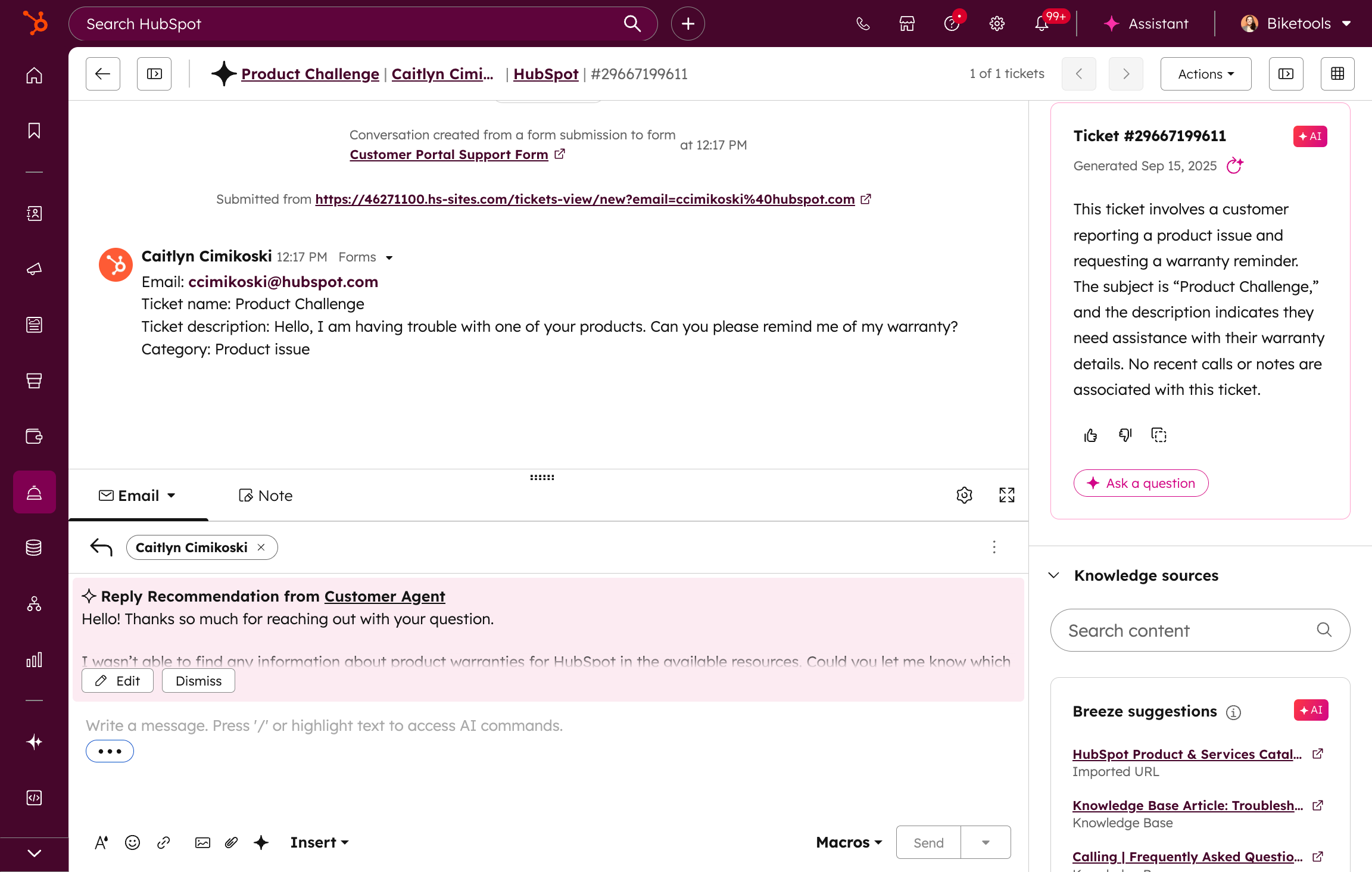
AI helps your team with difficult tasks, like suggesting replies that learn from your best responses. It also gives agents quick information about the ticket so they can understand it better.  Plus, automate multiple ticket actions with one click using support macros to make processes easier and save time. This will give your team the efficiency they need to deliver great customer experiences.

  1. Turn data into actionable insights that drive better support.

    Understand what's working and where to improve with real-time reporting built for support teams. Track team performance, monitor SLA compliance, and view agent availability at a glance with the Summary tab. Dive deeper with the Analyze tab to filter and save custom reports that reveal performance trends over time. Empower leaders with the Coaching tab to explore individual performance data and deliver exceptional experiences. AI Assisted Insights helps you analyze your reporting data with short summaries and important information from your data, so you can spend less time looking at numbers and more time doing what you need to do.
  2. Organize your team and optimize processes for maximum efficiency.

    Keep your support operation running smoothly with tools designed to deliver a seamless customer experience and scale alongside your business. Create dedicated team spaces with custom views and processes tailored to each group's needs. For example, mature teams that have advanced support operations can split or merge tickets, pause and report on SLAs, and manage rep capacity. Make sure the right person solves each problem with advanced routing and assignments. This feature has smart routing with built-in capacity limits to balance workloads and support good response times.
  3. Meet customers where they are with seamless support across every channel.

    Connect with customers wherever they are — email, live chat, phone, SMS, WhatsApp, and more — all from one unified workspace. Get complete customer context so your team can deliver seamlessly personalized experiences every time. With HubSpot's channel APIs and extensive app marketplace integrations, you can connect to any messaging or voice platform your customers use. No more toggling between tools or losing conversation history — just seamless, integrated support that turns every interaction into an opportunity to drive retention and growth.

Have questions? Give us a call and we'll walk you through it.

+1 888-482-7768

Looking for enterprise features?

HubSpot’s customer platform offers enterprise software for marketing, sales, customer service, content management, and operations. Get premium versions of all our free features — and much more!

Frequently Asked Questions

Get answers about HubSpot's help desk software features, pricing, and implementation

A help desk is a centralized tool for managing incoming customer issues. Help desks let you organize and record ongoing customer issues and provide a reference point for your customer-facing teams. Help desk ticketing systems also let you track efficiency metrics to manage the performance of your customer-facing team — things like response time, ticket volume, first resolution time, and optimizing the flow of tickets through their lifecycle to drive high customer satisfaction.

Many larger companies have multiple teams working in a single help desk. In this case, a help desk with built-in automation, folders, and escalation systems can be beneficial. 

HubSpot’s help desk software offers all of this and more to help you achieve faster ticket resolution. Use automation to send your tickets directly to the best rep on your team. Escalate effectively and efficiently so your customers never have to wait too long. Use HubSpot’s built-in knowledge base to document all of your existing knowledge and make it easy for customers to find answers.

Popular features of HubSpot’s help desk include:

  • Ticket automation and routing
  • Customer support performance metrics and reporting
  • Triage and SLA levels to meet all your customer needs
  • AI customer service features like bots and ticket summarization
  • Built-in knowledge base to quickly create and reference documentation
  • Integrated feedback surveys to track customer sentiment and happiness
  • 360-degree customer view, powered by HubSpot Smart CRM
  • Native integrations with Jira, Slack, and 1,700+ other tools
  • Multi-language support for global customer service

HubSpot’s help desk tools are part of Service Hub, and you can get started with select functionality for free. If you’re looking for more advanced features to help automate and scale your customer support operations, HubSpot also offers premium features with the Starter, Professional, and Enterprise editions of Service Hub. See pricing details.

If you’re already using a help desk, implementation time may vary based on factors like data migration and the complexity or amount of data you have to move over. For companies that have never used a help desk, the implementation time is much shorter — the only thing you need to set up is access for your team and their specific role.

HubSpot’s Smart CRM enables you to seamlessly combine existing customer data and leverage AI to empower your customer service reps to resolve issues quicker and offer personalized service at scale. Additionally, HubSpot AI-powered help desk software helps reps with language detection, ticket names, sentiment, ticket summaries, reply recommendations, and more. 

HubSpot's help desk software offers extensive integration capabilities to connect your entire tech stack. Native integrations include Jira for development team collaboration, Slack for team notifications, and Facebook Messenger for customer communication. The open API allows custom integration into your website admin panel and any business system. Over 1,000 integrations are available through the HubSpot App Marketplace, covering everything from project management tools to communication platforms. All integrations maintain data sync across your customer records, ensuring complete context for every support interaction regardless of which tools your team uses.

Yes, HubSpot's help desk software provides comprehensive multi-language support for global customer service operations. The platform supports Spanish, Italian, and dozens of other languages for both customer-facing interfaces and internal team communications. AI-powered language detection automatically identifies customer language preferences, while automated translation tools help agents communicate effectively. Knowledge base articles, chatbot responses, and email templates can all be created in multiple languages. Language preferences are stored in customer records and automatically applied to future interactions, ensuring consistent multi-language support across all channels.

HubSpot's help desk features scale across all Service Hub tiers to meet growing business needs. The free tier includes essential ticketing, shared inbox, live chat, and basic integrations—perfect for small teams getting started. Service Hub Starter adds automation rules, simple reporting, and enhanced integrations. Professional tier unlocks advanced features like customer portals, knowledge base, feedback surveys, and API access for custom integrations. Enterprise tier provides the most sophisticated capabilities including custom objects, advanced permissions, predictive lead scoring for support, and priority technical support. All tiers include multi-language support and core CRM functionality, with premium automation and customization features available at higher tiers.