Logo - Full (Color)

Sensitive Data

Store and use sensitive data in HubSpot Smart CRM safely, with the security controls and regulatory support your team needs.

  • Protect sensitive data, including health, demographic, and financial information, with an extra layer of encryption

  • Use sensitive data to segment audiences, qualify leads, and personalize outreach

  • Support HIPAA and GDPR compliance with audit logging and access controls

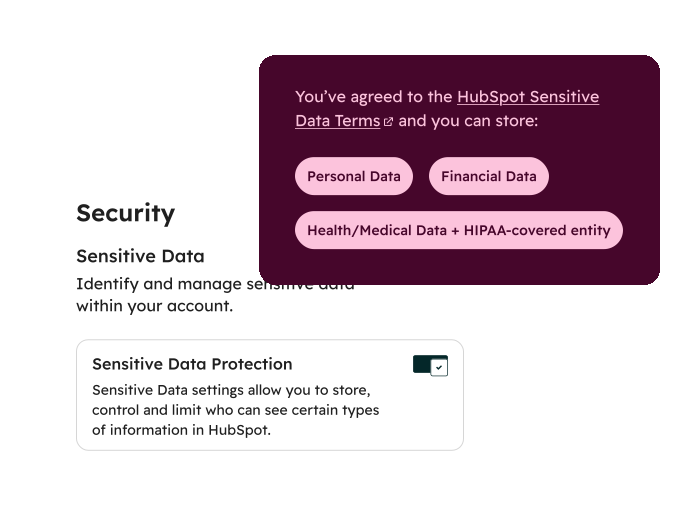
simplified product screenshot showing hubspot sensitive data security

When data governance is fragmented, your team feels it.

When sensitive data lives in your CRM, your team gets a complete picture of every customer without compromising on security. No more jumping between systems or working from an incomplete record. With sensitive data stored securely in HubSpot Smart CRM, the right people have the context they need to engage customers more effectively, all in one place.

  1. Securely store sensitive data where the rest of your customer record lives.

    Compliance requirements often force businesses to store their most sensitive data — financial records, health information, government IDs — in a separate system. With HubSpot, securely store regulated data types, including protected health information and demographic data, alongside all other customer interactions. With everything in one place, audience segments become more specific, campaigns more effective, and post-sale service more tailored to each customer.
  2. Keep up with data privacy regulations.

    HubSpot supports secure storage of personal information (PI), personally identifiable information (PII), and protected health information (PHI), giving your business the foundation to operate in compliance with regulations like GDPR and HIPAA. That includes comprehensive audit logging, a Business Associate Agreement (BAA), and field-level permissions that help ensure only the right people can access sensitive data. You can also scan and redact sensitive data that appears in CRM activities, like notes or call logs, so confidential information stays in the right hands.
  3. Protect your data from breaches and bad actors.

    HubSpot adds an extra layer of application encryption to sensitive data to give your account increased protection. Security health recommendations, inactive session timeouts, and advanced authentication features, like two-factor authentication, help you follow best practices and make sure only authorized users can access sensitive data. Admins can also monitor and review user activity to stay on top of who's accessing what.

Have questions? Give us a call and we'll walk you through it.

+1 857-829-5060

Frequently Asked Questions

Find quick answers to common questions about HubSpot’s sensitive data features. 

Sensitive data is confidential personal information that requires special protection to keep it safe and out of reach from all outsiders who don’t have permission to access it.

Examples of sensitive data that can be stored in HubSpot:

  • Demographic data (such as ethnicity, gender, age)
  • Citizenship
  • Immigration status
  • Some government-issued identifications
  • The last four digits of bank account numbers
  • Salary data
  • Health data (including protected health information subject to HIPAA — i.e., health data from covered entities and business associates)
Please refer to our Sensitive Data Terms for a full list of the types of data that can be stored within sensitive data properties.

If you turn on sensitive data, the sensitive properties that you create will not be used to train HubSpot’s AI models. However, other customer data within your portal may be used to train HubSpot’s AI models. You may opt-out of having your customer data used for machine learning by emailing privacy@hubspot.com. For more information, please review HubSpot’s Terms of Service and HubSpot’s Privacy Policy.

When using HubSpot’s AI products, do not share any sensitive data in your prompts. HubSpot’s AI products are not part of our sensitive data features, and sensitive data should not be input into these tools as a prompt. Certain AI products may process sensitive data, which you may not have intended to include when generating results based on the prompt entered. These tools include:

For more information on using the sensitive data features, please review the knowledge base article.

HubSpot provides privacy and security protections that enable our customers to operate our products in compliance with HIPAA. These include security features like comprehensive audit logging, advanced authentication features, inactive session timeout, account security recommendations, application level per tenant encryption, and more. Please refer to our Trust Center for resources on storing Sensitive Data to ensure that you use our products and services in a way that supports your HIPAA obligations.

The HubSpot BAA is included by reference in the Sensitive Data Terms for our Covered Entity and Business Associate customers storing protected health information in their account.

Sensitive data is supported within the following features: CRM object properties (including manual update, import, export, and properties API), CRM activities, CRM objects API, list creation, workflows, search, reporting, integrations, forms and form submissions authenticated API, and lastly, CRM attachments added to records manually, or via notes, email, forms, or sensitive file properties.

Note that HIPAA data is supported in the features above, except the Snowflake data share integration.

Adding sensitive properties is limited to certain objects within HubSpot. These objects include contacts, companies, deals, tickets, and custom objects. Please refer to our Sensitive Data Terms for a full list of features that work with sensitive data properties.

By default, data stored in HubSpot is encrypted in transit with TLS 1.2 or 1.3 and at rest using AES-256.

For sensitive data, HubSpot add an application layer encryption also using AES-256, with unique encryption keys for each customer. For more information on the security of these features, please review the HubSpot Trust Center

Super admins can set up field-level permissions to restrict view and edit access for the property to specific users and teams. HubSpot strongly recommends that you set up this kind of permissioning to ensure that sensitive data can only be seen or modified by select users. Additionally, HubSpot recommends that you perform user access reviews to understand which users have super admin access. Users with super admin access can view and edit sensitive data properties. For more information on using the sensitive data features, please review the knowledge base article.